
How to Prepare Your Site for AI Agents
Search engines aren’t the only automated systems accessing, interpreting, and making sense of content found…

SEO Migration Cheat Sheet – TL;DR
Set Clear Goals & Audit Everything
Outline objectives (e.g. rebrand, HTTPS move), run full technical/on-page/off-page SEO audits, and benchmark current performance before migration.
Backup, Crawl, and Redirect
Backup your old site, crawl all URLs (e.g. with Screaming Frog), and set up 301 redirectsA redirect is a web page that loads in place of another web page. to preserve link equity and avoid broken linksHyperlinks, also known as links, are the connection points on a webpage that take you to other webpages..
Control Staging Site Indexing
Block search engines from crawling your staging site using robots.txt, and don’t forget to remove the block at launch.
Launch with Optimisation
Submit a new XML sitemapA site map is a list of pages on your site and their relative importance. Use sitemaps to make it easier for visitors to find what they're looking for, and to ensure that search engines can find all the information they need. to Google Search Console, fix any post-launch SEO issues (broken links, duplicate contentDuplicate content is content that appears more than once across a single website. Duplicate content can be a sign of poor resource management, low trust, or a lack of quality control.), and clean up technical errors.
Update Backlinks & Monitor Performance
Reach out to update backlinks pointing to your old URLs, and perform a post-launch SEO audit to track rankings and identify any dips early.
As a business evolves and its needs change, many companies decide to move websites to complement their brand and provide a smoother user experience. However, website migration is a big undertaking, as one wrong move can ruin your SEO efforts to date, impairing your site’s online visibility, traffic, and sales.
Of course, you will want to avoid destroying all your progress and Google ranking. Prevent the worst from happening by reading the following SEO migration cheat sheet.
Most SEO experts understand the risks involved during a site migration, as a few small mistakes could impact your daily traffic and ranking in the SERPs. Protect your online presence by creating a detailed website migration checklist to ensure you cover every base during the transfer process.
 Develop a Clear Outline of Objectives
Start by outlining your site’s objectives to quickly identify potential challenges and the best solutions. For instance, you may want to:
Measure Your Site’s PerformanceMany website owners fail to research keywordKeywords are the words and phrases that potential customers might search for to find your business. performance and organic results before and after a web migration. Unfortunately, missing this step will prevent them from identifying if the transfer was a success or failure.
Gain a deeper understanding by monitoring various metrics a few months before undertaking a website migration, such as URLs and keyword ranking positions. It will provide a greater knowledge of how your keywords often perform before a transfer, helping you to determine if a site migration has positively or negatively affected its ranking and traffic.
Perform a Thorough Technical SEO AuditThe last thing you will want to do is replicate mistakes on a brand-new website. Technical SEO audits can effectively identify the elements that need to remain or be removed. It will pinpoint on-page SEO issues you will need to address, such as:
Also, a technical SEO audit will review many off-page elements, such as:
All the above could impact your new site’s performance, which you must optimise during staging to ensure you only transfer the best elements during a website migration.
Backup and Scrape Your Old WebsiteOne of the most important steps in any site migration checklist is to back up your old website. The handy copy will allow you to restore a site to a previous state if the migration goes pear-shaped, allowing you to start afresh without hassle or fuss. Also, you can use a backup to pinpoint potential problems during the website migration process.
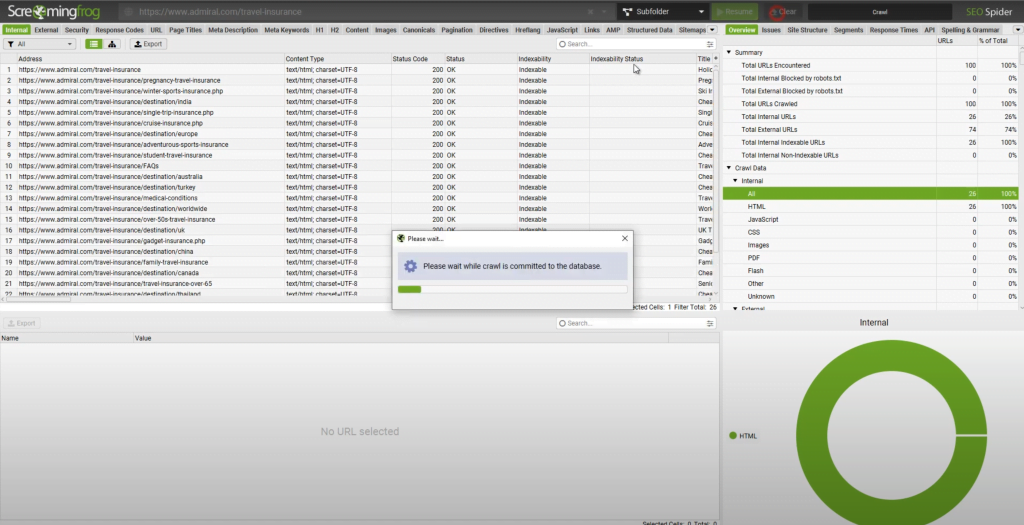
In addition to creating a backup, you must perform an in-depth crawl of your old website to pinpoint possible mistakes. We suggest using Screaming Frog to effectively crawl your website and develop a detailed list of your existing URLs (including ones you may not know existed), set up 301 redirects, identify the best content to keep or edit, and gain an understanding of your site’s architecture.
Block Crawlers from Indexing Your Staging SiteBuilding a brand-new website for your business will feel exciting, as you will be eager to provide its visitors with a professional, easy-to-use, and aesthetically pleasing site that better complements your brand, values, and goals.
However, creating a staging site before a migration can pose a threat, as Google may crawl and index it, resulting in users visiting an incomplete or broken website. Stop this from happening by ensuring you block all crawlers from accessing a staging site before migration. For instance, use the robots.txt fileA robots.txt file is a simple text document that you can use to control the behavior of search engine crawlers in your site directory. during staging, but remember to remove it once the new site is ready to launch.
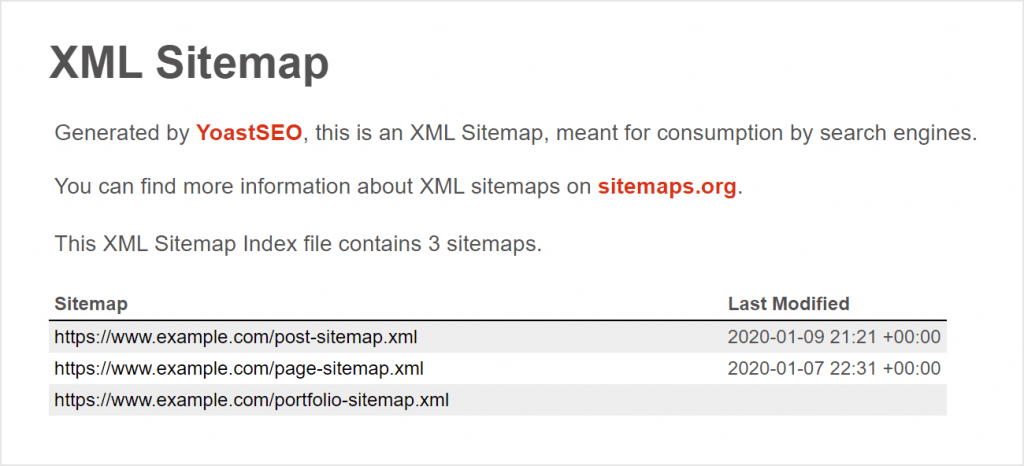
Create an XML Sitemap for Your New SiteThe next step on your SEO migration checklist should be to create an XML sitemap for your brand-new site. It is crucial for online success, as it informs Google how to successfully navigate the site and ensures its content is discovered at a faster rate, speeding up the indexing and ranking process. Once you have attached an XML sitemap to your new site, remember to upload it to Google Search Console to monitor your site’s performance.
An SEO Migration Clean UpFollowing the website migration process, you must clean up various SEO errors to protect your site’s visibility in the SERPs. For instance, you may scan the site to remove duplicate content, fix broken links, and correct any other errors. Again, don’t forget to remove the robots.txt file from a staging site to help Google start crawling your new site’s pages.
Update All High-Authority BacklinksAs your site will change, you must ensure its backlinks change, too. To prevent wasting your link building efforts to date, we recommend reaching out to each site owner who is sharing your link to ask them to update it with your new URL. It may take time and perseverance, but your efforts could stop your Google ranking and traffic from gradually dwindling.
Perform Another SEO AuditOnce you have followed the above steps in your website migration checklist, you must perform another SEO audit to identify possible problems and review your SEO performance.
Get started by reviewing your new site’s:
An SEO audit can help you identify if a website migration has increased your keyword rankings or caused an unwanted drop.
The site migration SEO checklist above can help you avoid simple mistakes when moving websites. However, you mustn’t underestimate the risks involved, as one or more errors could threaten your Google ranking and web traffic.
Take the stress out of the process by contacting our friendly, experienced team at Click Intelligence to learn more about our smooth and effective website migration service. As experts in the field, you can trust in our extensive SEO services, such as international SEO, content marketing, SEO consultancy, and much more. Call or email us today to discuss your migration wants and needs.

Search engines aren’t the only automated systems accessing, interpreting, and making sense of content found…

For years, brands across industries have had one focus: getting higher Google rankings so their…
Google's Core Web Vitals reports how a page performs, and here's our checklist to improving page experience this 2022!

SEO is constantly in flux. The methods that digital marketers use to get domains to rank change constantly. What was…

Outreach emailing is a traditional marketing strategy that involves sending an email to someone with whom you have no previous…

The amount you invest in your link building budget should be based on the realistic…
Search engines aren't the only automated systems accessing, interpreting, and making sense of content found…

There's plenty of scope when creating SEO campaigns. Each industry that turns to experts for…

PR has long supported brands in building authority and spreading awareness, but PR distribution has…

Towards the end of September, on the 24th, Google released the second spam update in…

Some backlinks can help a key service page gain authority, while others help to strengthen…

SEO can be complicated. It’s constantly changing and is not a one-and-done job. That’s something…

AI has become part of how people research and look for products, as well as…
If you are looking to increase your traffic, sales & leads, let's have a chat!

The team will usually respond within 1 hour.

Comments (2)