
How Can Brands Compete in ChatGPT Without Paying for Ads?
AI has become part of how people research and look for products, as well as…


You’ve come up with a business idea and put the plans in motion. Your website is created, your team is ready for your business to drop, and you’ve unleashed a massive marketing campaign that has prospective customers chomping at the bit.
What could go wrong?
Well, a lot of things, which is why you need to have a pre and post launch checklist when it comes to your SEO. Not only could this save you money and time, but it can save your brand from being tarnished on its first day of opening its virtual doors. After all, an effective and working website is the key to your consumers’ hearts.
While your website’s aesthetics are important, how your website functions is just as crucial – and not just for your customers but for the SERPs, too. Here’s your pre launch technical SEO checklist.
A lagging and slow website infuriates customers and can cause them to leave your site in anger, never to return again. Customers clicking onto your website and then clicking off sends a red flag to the likes of Google, as it signals high bounce rates – this is a huge issue.
People are likely to leave if a webpage takes longer than three seconds to load. Reduce loading times by reducing the number of images and amount of text on the page.
Check that your website can handle a lot of traffic, especially if you are expecting a lot of people heading to your site for the launch.
More people are turning to their phones and other electronic devices to access the web, so ensuring that your website is optimised for a mobile is essential. Not only does it keep your customers happy, but Google also rates pages on its mobile experience.
Mobile searches not only help with search ranking, but they also lead to more purchases. People are buying from their phones more than their desktops – the process is becoming easier and more streamlined.
Content marketing is a must for organic trafficOrganic search traffic (sometimes called natural or unpaid search) is the traffic that's driven to a website because of unpaid placement on a search engine results page.. Lessen the load by having content already written and ready for publishing so that you don’t have to rush articles that are low quality. Stockpile optimised content and release it slowly, so people can see that your website is active and legitimate.
Check that you have enough content ready before the launch and that all of the copy is optimised for SEO purposes.
You don’t have to launch a website and audit your on-page copy to see whether it’s optimised. Do keyword researchKeyword research helps websites unearth the best keywords to drive traffic and visibility. This research is supported by a number of powerful web-based tools, the best of which we’ve listed here. and write your content with these keywords in mind (although, ensure they are natural and not overstuffed). Having an on page SEO checklist can seem overwhelming when it comes to ticking every box, however, we have plenty of SEO services to offer so that the weight is lifted from your shoulders.
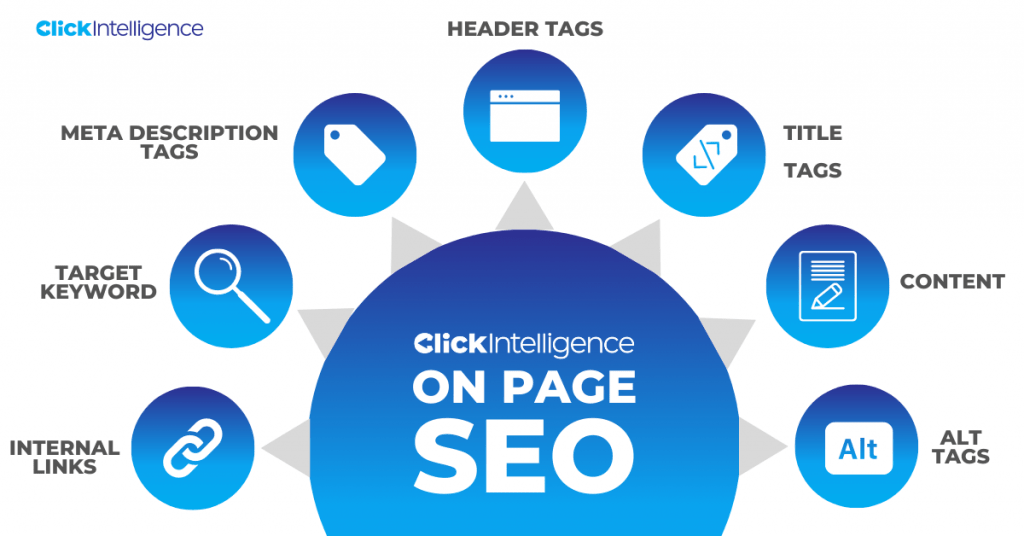
You’ve launched, now what? There’s plenty of work to be, such as looking for areas of improvement and running an audit. This is your technical SEO checklist for post launch.
Auditing your content allows you to see how effective your content is and whether any changes need to be made. SEO auditing can help you fill in any gaps that may have arisen within your content, pointing out if any changes need to be made.
The number of people clicking onto your blog, staying there, and making a purchase indicates the health of your website. After your launch, you will want to keep eyes on your website’s analytics and see whether you have reached your benchmarks and, if you haven’t, how far away you are from reaching them.
A sudden drop in traffic or high bounce rateBounce rate is the percentage of visitors to a website who visit only one page. A high bounce rate indicates that visitors are not satisfied with your website. indicates that your website and its content is not offering what your consumers are looking for or your website’s navigation needs work.
As you continue to add more content to your website, such as blog posts, include more internal linking for an SEO edge. Ideally, you will have a pillar piece that’ll off-shoot to other pieces of content – keeping your audience engaged.
Internal linksHyperlinks, also known as links, are the connection points on a webpage that take you to other webpages. need to be relevant, however. You cannot link to any page; doing so will only dampen your SEO efforts and cause issues with Google.
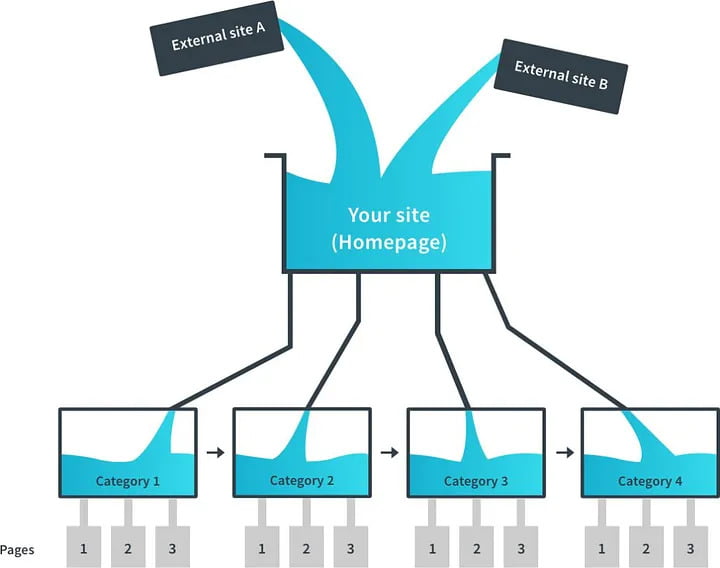
This is an SEO-killer, and while 404 errors happen, you need to get rid of them before they cause anymore damage. Google will not index this page because, quite simply, it does not exist. And while the actual 404 page will hurt your SEO efforts, any URLs/internal links that point towards a 404 error will create a bad user experience.
Not sure how to implement our on page SEO checklist? Contact us for information on how our SEO services can help you check all the boxes of your technical SEO checklist.


AI has become part of how people research and look for products, as well as…

If you’ve ever tested your website using Google PageSpeed Insights, you’ve probably been met with…
SEO is constantly in flux. The methods that digital marketers use to get domains to rank change constantly. What was…

Without the correct tactics, your website doesn’t have a chance of appearing prominently on search engine results pages. Because if…
Link Building or Managed SEO which is right for me?

Some backlinks can help a key service page gain authority, while others help to strengthen…

SEO can be complicated. It’s constantly changing and is not a one-and-done job. That’s something…
AI has become part of how people research and look for products, as well as…

Growing an SEO agency takes a lot of hard work. You've got to keep up…

Google announced it was rolling out a further spam update on August 18, 2026. It…

Instead of scrolling through pages and pages of endless search results, more people are now…

When your target customer heads to Google to search for a product or service, or…

Artificial intelligence (AI) is changing the way that people are searching for information. Tools like…
If you are looking to increase your traffic, sales & leads, let's have a chat!

The team will usually respond within 1 hour.