
How Can Brands Compete in ChatGPT Without Paying for Ads?
AI has become part of how people research and look for products, as well as…


Lighthouse is a tool that Google released back in 2018 to offer new insights for webmasters on how they can improve the quality of their pages. It is an open-source, fully automated tool that runs a variety of checks to help you improve each page’s performance, whether best practices are being used, and its accessibility.
It is an invaluable tool for webmasters and SEO analysts alike and understanding it in more depth can allow you to improve your website page-by-page.
Google’s Lighthouse audit tool is a Chrome-based tool that allows you to conduct an SEO audit or site audit of every page with ease. It is designed for everyone to use and helps everyone improve their on-site SEO with just a few easy suggestions.
There is so much to love about this Google audit tool, which is why it’s such a game-changer for SEO analysts, web developers, and content creators alike.
Lighthouse makes SEO auditing simple and puts the power of an audit in the hands of whoever needs it. It’s an easy to use tool that takes the guesswork out of so many elements of technical SEO, and above all else – it’s free!
In the past, an SEO technical audit was only something that could really be completed by an SEO analyst. In many ways, this is still true, but with the Google Lighthouse tool, you can get a brief, useful overview of areas you need to improve. It won’t cover every single angle a specialist SEO audit will, but it does give great guidelines for you to follow.
It’s easy to use, and more importantly, designed to be used by non-developers, putting a better, more SE-driven website in the hands of everyone who owns their own website.
Lighthouse is an upgrade to the old audit panel that was available on Chrome. Since the update to Lighthouse, the entire interface has changed, making it easier to use for everyone and available right within Chrome itself.
With Lighthouse web development is easy. It takes the guesswork out of the improvements you need and what performance metric your site isn’t measuring up to. You can easily see the exact metrics that Google’s SE algorithm looks for and follow the suggestions Lighthouse recommends improving the performance of your website.
Why would Google do this? Easy, because though they don’t inform SEOs of what their algorithm looks for specifically, their guest as always to been to provide better results to their users. Better results include high quality, high performing websites.
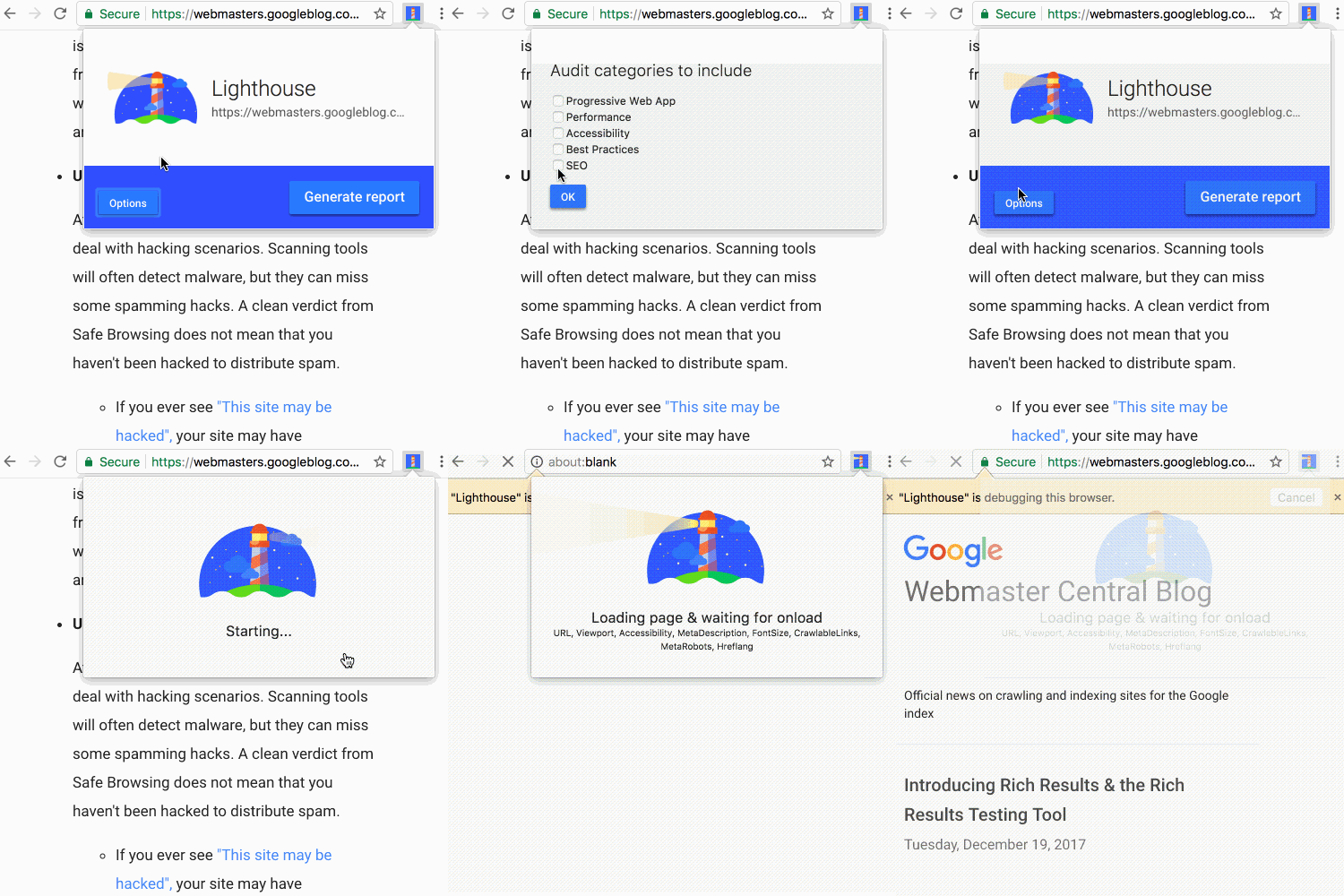
With Google Lighthouse, you can generate a Lighthouse report in just a few simple steps. With the tool installed into your Chrome browser, you can check for a variety of crucial website standards and whether your page is measuring up to them.
Just some of the metrics that Lighthouse will analyse and present suggestions for include:
Site performance is at the heart of any technical SEO audit. Speed, for example, is one of the most essential metrics both for users and for algorithms. Lighthouse will also look to diagnose issues for you, find opportunities for improvement, and can break it down into the exact process. Loading times, for example, are comprised of three components, and narrowing down which of the three is causing issues can help you speed up your website.
Not only will Lighthouse diagnose issues, but it will also present solutions, like reducing image size.
Lighthouse will also check how accessible your site is for users who need additional tools, for example, how well the screen reader technology works on your website.
Progressive Web Applications (PWA) can also be checked through Lighthouse based on speed, reliability, and engagement. This feature is of most interest to developers, yes, but it is essential to help you see which PWA has failed, and how to fix it.
Best of all, of course, are the Lighthouse best practices recommendations, which goes through each page and compares your elements to the best practices of web design today. This way, you can use your SEO audits from Lighthouse to see real results and improve the design, user-friendliness, and SE ranking of your site all at once.
To install Lighthouse, you have a few different options.
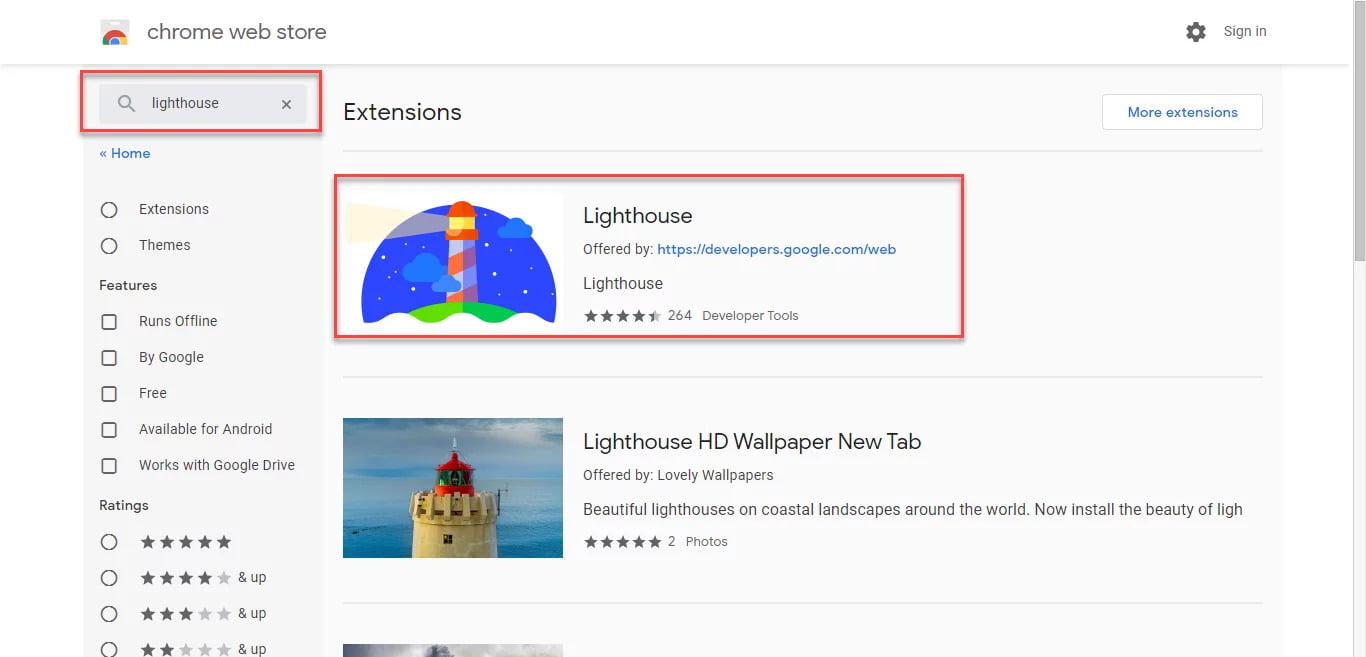
The easiest way to install and use Lighthouse is to go to the Chrome store and download the free extension and add it to your browser. Once installed, you can check each page right within your browser by selecting the Lighthouse icon on your browser and clicking “generate report” to see any issues and recommendations.
Chrome DevTools is the best way to use Lighthouse on pages that need authentication. All reports generated are user-friendly and easy to understand.
Though you will use a different installation method, you will also need Chrome for this tool to work.
With Chrome DevTools, you just need to go to the page you want to audit, right-click, and then select “inspect element”. There will be an audit tab to Google Lighthouse, where you can then run the audit and get a report back in 90 seconds or less.
Google Lighthouse has completely changed the game when it comes to SEO audits. It isn’t perfect, but it does give you a good idea on which pages require help and how you can get the job done.
For a more comprehensive SEO audit, then you will want to hire a professional SEO audit service, which goes through all the different metrics of your website, both in terms of technical SEO and the content itself to ensure your site is using all of the best practices of today. Need support with managed SEO? contact us today.

AI has become part of how people research and look for products, as well as…

If you’ve ever tested your website using Google PageSpeed Insights, you’ve probably been met with…

Digital marketing is a requirement for any business that wants to entice, engage, and excite customers online. When putting together…

It's clear that a new management approach can do wonders for your company, and one of the most cutting-edge and…
Here is how to find the perfect link building partner, download today!

The amount you invest in your link building budget should be based on the realistic…

Search engines aren't the only automated systems accessing, interpreting, and making sense of content found…

There's plenty of scope when creating SEO campaigns. Each industry that turns to experts for…

PR has long supported brands in building authority and spreading awareness, but PR distribution has…

Towards the end of September, on the 24th, Google released the second spam update in…

Some backlinks can help a key service page gain authority, while others help to strengthen…

SEO can be complicated. It’s constantly changing and is not a one-and-done job. That’s something…
AI has become part of how people research and look for products, as well as…
If you are looking to increase your traffic, sales & leads, let's have a chat!

The team will usually respond within 1 hour.