
How Can Brands Compete in ChatGPT Without Paying for Ads?
AI has become part of how people research and look for products, as well as…


There are a lot of things within SEO and website optimisation that many people perceive to be too technical and too difficult to try themselves, and one of these is definitely the intimidating sounding schema structured data. With its close connection to coding, many people are scared stiff by the idea of implementing this increasingly crucial ranking factor, meaning that more and more websites and businesses are failing to grow to their full potential simply because they’re avoiding this SEO task.
If this is you, it’s time to set that fear to one side and start to embrace the benefits of this SEO technique. There is a bit to wrap your head around, especially if you’re starting from scratch with no experience in writing code, but if you stick with it, you’ll find that after some time, it really isn’t as scary as you first believed.
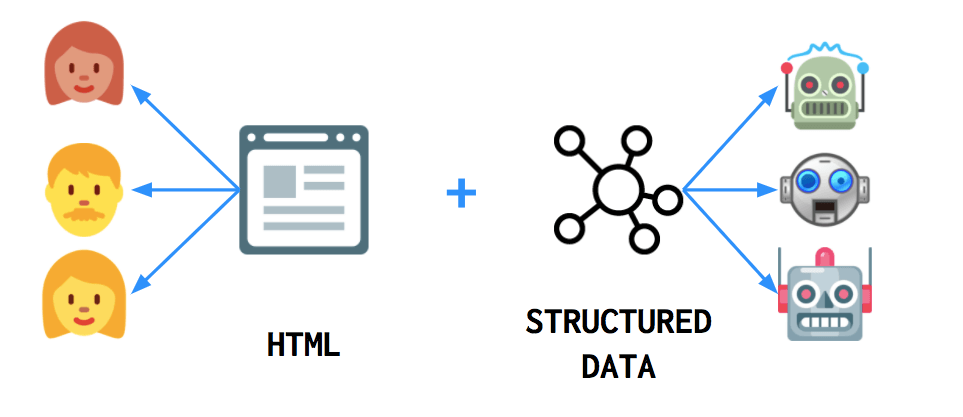
The best way to get started in schema structured data – also known as markup structured data – is first to understand why it’s useful. In its essence, markup structured data is a type of code that makes it easier for search engines to crawl, organise and display your content. Basically, implementing this technique allows Google (and other search engines) to understand the context of your content, which can benefit its ranking and performance. Without this markup, search engines can only tell what your data says, and the algorithms involved will have to work a lot harder to determine why it’s there fully. The ‘why’ is important, as this is what helps Google determine if the content is relevant for a user.
So, if you wanted to add contact information to your website, you could simply add it to your footer or on an about page, and that would have been just fine, as users would easily understand that the info is what it is. However, a computer isn’t that clever, and Google might not figure out what the data actually is. By using the appropriate schema markup, you’ll be able to inform Google what it is and why it’s there, which will make it more effective. Not implementing schema markup is the most common issue that crops up after conducting an SEO audit, so it’s worth learning to improve your SERPs performance.
There is a lot to learn within schema to become an expert, so much so that there are courses and certifications that you can enrol in; however, that might not be necessary if you’re using this technique for specific functions. Instead, there are just a few things that you should know that should allow you to use this technique properly and to good effect.
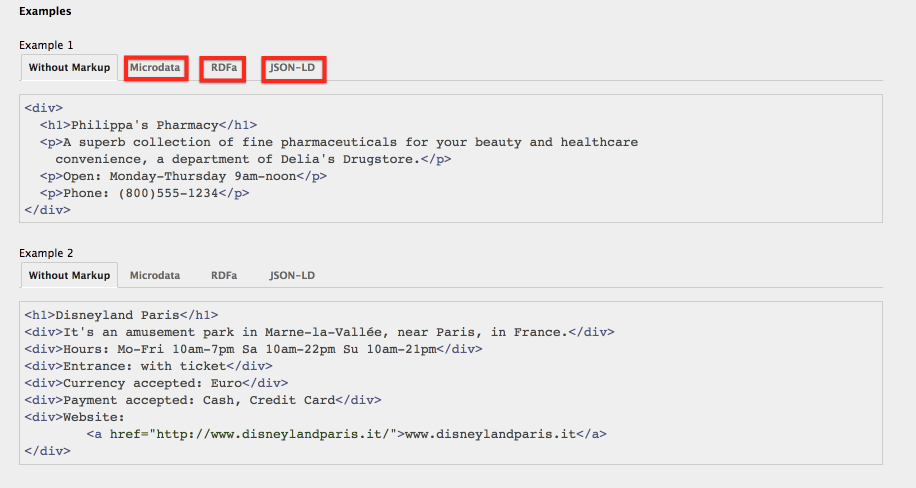
The data that you can markup with technique can be different and serves different functions. Three main types of data will commonly crop up. These are:
These types of markup structured data have different properties that really aren’t vital to learn right now; however, it is important to know that JSON-LD is the recommended format and is the most widely used one, so when implanting your own markup, you must ensure that you’re using this one. The reason for that is simple: unlike the other two mentioned, this type of schema can be read by Google when dynamically injected into the content of a page.
Terms are basically the different functionally that each type of markup can do. One term will categorise your content, for example, while a different one will highlight that the associated text is part of the same topic. It’s not crucial to learn them all. However, understanding and becoming competent in a few of them can be very beneficial to your SEO strategy and help you learn and develop this skill faster. Three of the most common terms include:
So, say you have some HTML that looks like this:
<div>
<h1>Manchester United</h1>
<span>Manager: Ole Gunnar Solskjaer</span>
<span>Premier League – England</span>
By adding an itemscope tag to this code, you’ll be able to let Google know that all this information is about the same topic and thus needs to be presented together and that they’re relevant to each other. By including the term ‘itemscope’ at the end of your opening <div> tag, you’ll be able to ensure that all this info is grouped together. This is one of the better and easiest ways on how to add structured data to your site, and it looks like this:
<div itemscope>
<h1>Manchester United</h1>
<span>Manager: Ole Gunnar Solskjaer</span>
<span>Premier League – England</span>
<div itemscope itemtype=”http://schema.org/SportsTeam”>
<h1>Manchester United</h1>
<span>Manager: Ole Gunnar Solskjaer</span>
<span>Premier League – England</span>
You may have noticed that there’s an URL included in that additional piece of code. This is what Google searches to help the platform understand what type of content you’re talking about. Schema.org has a lot of different itemtypes that you can include within your markup structured data.
<div itemscope itemtype=”http://schema.org/SportsTeam”>
<h1 itemprop=”name”>Manchester United</h1>
<span>Manager: <span itemprop=”Coach”>Ole Gunnar Solskjaer</span>
<span itemprop=”memberOf”>Premier League</span – England</span>
Now that you know a handful of some of the more crucial schema markup to add to your website, you may be thinking about how you actually implement this. The bad part about adding this markup is that it can be incredibly time-consuming to add manually, especially if you’re a newcomer to the technique and are unsure about the process. Thankfully there are solutions to help make it easier and quicker to add this functionality, and that’s through website plugins.
A plugin is a piece of functionality that can be added to a website to make it better. Examples include adding calendars, interactive maps, and more to your site. For people that utilise WordPress to create and organise their website, one of the best plugins that work well with the CMS platform is Schema App Structured Data. This plugin will automatically generate appropriate schema for your website without you having to do a thing, and for further control, you can always go in and make edits manually if you want to do something different. Applications like this make schema markup structured data a lot more accessible to people, giving you to tool to thrive online.
However, if you don’t use WordPress to build your website, then you’ll have to go a different route to implement schema, although it is still a simple process. Using Google’s Structured Data Markup Helper tool, you can simply copy and paste the URL of the webpage that you want to generate schema for to start the process. Alternatively, you can also copy and paste the HTML as an option. Once that is done, you then need to select one of the ten categories that Google provides to help them categorise your data. The options are as followed:
These options may seem limiting at first, but you’ll usually find a suitable category to label your content. Using our example of the Manchester United profile, it’s probably best to click Article, as none of the others apply.
Once you’ve done that, click ‘Start tagging’ and you’ll then get transported to a new screen that’ll have your page displayed on the left and then a pane on the right that’ll have the schema markup tool. What you do on this page is simply drag over and highlight content on your page. When you do that, options will appear that you can tag that information as.
You can tag names, authors, and images, and it’s a good idea to tag everything that is suggested. Once that is done, you’ll have an HTML code generated. When it is, be sure to mark it as JSON-LD type, as this is the one that Google likes most. Once you have that generated, the next step is to add this to your website’s source code.
This is done by opening the current code on your website and replacing the old version with the new one generated by the tool. If your site only has static page files, then this is super easy. Once that is done, viola, you have a more optimised website with markup structured data implanted. Do this for every page on your website, and you’ll find that your website benefits greatly.

AI has become part of how people research and look for products, as well as…

If you’ve ever tested your website using Google PageSpeed Insights, you’ve probably been met with…

Seasonality can have a huge effect on the success of your business. It is imperative to have a strong digital marketing campaign during periods of high consumer demand.

Without the correct tactics, your website doesn’t have a chance of appearing prominently on search engine results pages. Because if…

If Google's latest Core Web Vitals update has caused havoc to your SEO results, find your solution in our latest in-depth eBook.

The amount you invest in your link building budget should be based on the realistic…

Search engines aren't the only automated systems accessing, interpreting, and making sense of content found…

There's plenty of scope when creating SEO campaigns. Each industry that turns to experts for…

PR has long supported brands in building authority and spreading awareness, but PR distribution has…

Towards the end of September, on the 24th, Google released the second spam update in…

Some backlinks can help a key service page gain authority, while others help to strengthen…

SEO can be complicated. It’s constantly changing and is not a one-and-done job. That’s something…
AI has become part of how people research and look for products, as well as…
If you are looking to increase your traffic, sales & leads, let's have a chat!

The team will usually respond within 1 hour.