
How Can Brands Compete in ChatGPT Without Paying for Ads?
AI has become part of how people research and look for products, as well as…


For many, the phrase ‘source code’ may conjure up images of Jake Gyllenhaal repeatedly dying on a train, while for others who may not have seen that movie, the term may sound like science fiction mumbo jumbo. However, within digital marketing and search engine optimisation circles, the source code is an important and beneficial aspect that can influence the performance of your website in terms of SERPs ranking.
Additionally, unlike how convoluted and crazy it may have seemed in the blockbuster movie, source code isn’t that scary at all and isn’t that hard to manipulate to help give your SEO a well-deserved boost. If you’ve already exhausted all the usual beginner SEO practices such as link buildingLink building is a process of acquiring links pointing to your website. These links are obtained by creating content, participating in social media or commenting on other blogs. and keywordKeywords are the words and phrases that potential customers might search for to find your business. optimisation within your content, here’s a good, intermediate SEO tactic that not every website will be doing. This means that optimising your source code to include basic SEO HTML can be a useful way to climb the rankings above your competitors.
The source code is the language that web browsers use to figure out how to display your website and its contents. A source code is essentially instructions on where things are meant to be placed and what functionality it can have. Of course, this can’t just be written and explained in simple plain English. Instead, source code uses a variety of different inputs to convey what is being said. It’s these inputs that make source code look really intimidating for beginners, but once you get comfortable with it, it’s really not that hard.
Source code is important for a website, as Google and other search engines use it to figure out what your website is about, and thus, what search results it should rank for (among many other factors, of course.) Due to this, it’s important to occasionally check out your source code and see if there are any basic SEO HTML changes you can make to it.
To view your source code, all you have to do is open the webpage you want to view and input one of the following inputs to your keyboard:
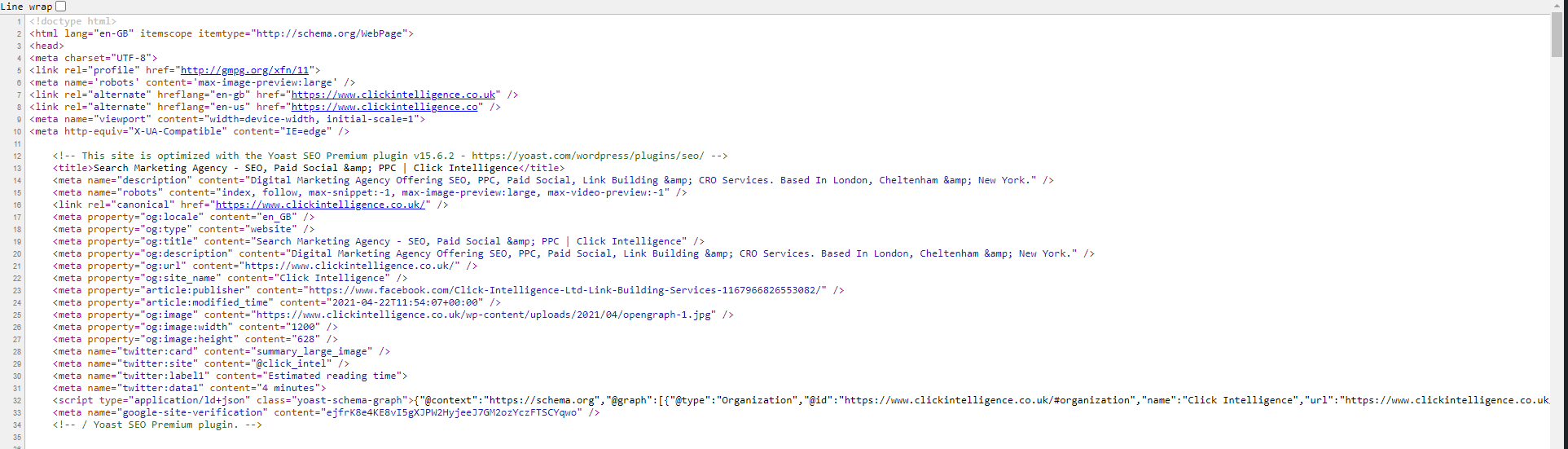
When building a website with a CMS such as WordPress, they might automatically add source code to your content for you, especially if you’re using a plugin to help optimise and create SEO friendly HTML. However, it’s always worth checking your source code before making a page live to ensure that your content is tagged in the exact way you want. To add additional source code or edit it to optimise your website better, you’re going to have to do it manually. To do that, you’re going to need to learn some of the basic and most used tags.
Here’s a list of some of the ones you’re going to need to use to help create basic SEO HTML. You can learn more about this type of thing as well as other SEO tactics at our Intelligence Hub.
If you’re only going to learn one source code tag, make sure that it’s the title tag. The reason for this is simple, it’s the most important element on any web page, as it’s what Google uses to display your webpage when it appears in the search results. To avoid confusing or breaking your website, you need to ensure that there’s only one title tag.
To add it into your source code, simply encompass your copy with the following so that it looks like this:
<title>Source Code Optimisation </title>

When crafting your title for your pages, you want to ensure that it’s both optimised with keywords and also reads well so people are more inclined to click the link and check out your website.
The meta description is a piece of code that goes at the top of your page that is used to help describe and give more information about your page and what it is about. It’s always a good idea to include a meta description into your HTML, as a lot of companies fail to do this, giving you an opportunity to take advantage. The meta description also appears on Google search results and can be a great way to attract more users. It is also a good additional area to include your target keywords to help boost your ranking.
Adding a meta description isn’t too hard; all you have to do is encompass your desired text so that it looks something like this:
<meta name=” description” content=” Learn some of the best ways to optimise your source code for SEO to boost website performance.”/>

When writing a meta description, be cautious that there is a character limit of 160 characters, including spaces, so you want your descriptions to be concise and attractive. It’s also a good idea to include a call to action to make it more engaging and to entice a larger readership.
H1 tags are used to alert the web browser that a piece of text is the main heading of the page and thus needs to be displayed as such. An H1 tag is a great way to help you to organise your webpage better and dictate the layout. What you write here should be warm and inviting and written with a human audience in mind, but it doesn’t hurt to try and optimise it with a natural-sounding keyword.
These basic SEO HTML tags work just like the previous ones did. Simply encompass the heading with the tag so that it looks like the following:
<h1> How To Optimise Your Source Code For SEO </h1>
In addition to H1 tags, there also exists <h2>, <h3> and even <h4>. These are subheadings that help the web browser better display the content. So using this article as an example, within the source code, the various headings in the piece will look as followed:
<h2> What is a source code?</h2>
<h2>How To Add Source Code</h2>
<h3>1. Title Tag</h3>
<h3>2. Meta Description</h3>
<h3>3. H1 Tags</h3>
As you can see from the example above, H2-H4 tags can be used more than once; however, an H1 tag should only be used a single time per webpage, as this will be the main title for the content.
Internal links are vital for a website, as it’s what gives your pages their interconnectivity. It’s a good idea to tag these links to ensure that you have SEO friendly HTML, which can improve your website. This is because when tagging links within the source code, it helps give Google and other search engines an idea of what the page the link goes to is all about, and this can have a whole host of ranking benefits.
To add this piece of basic SEO HTML, you’ll have to enter a specific type of source code. So for the internal linkInternal links are links that connect different pages on your website. They help users navigate your site and make it easier to find information, that’s previously mentioned in this article, the source code for it will look like this:
<a href=”https://www.clickintelligence.co.uk/knowledge-hub/guides/”>Intelligence Hub</a>

The URL within the quotation marks is the destination of the link, and the text at the end is the anchor – this is what will be highlighted and hyperlinked within the page. Adding source code like this can help organise your entire website and make it far more understandable for search engines and their algorithms to decipher.
As websites become more and more graphic and visual entities, more imagery and pictures are being included in the design to make them more appealing to users, boosting UX, which is important. However, these images are almost impossible for Google to understand and work out what they’re displaying. If you fail to tag your images, you’ll lose out on a chance to increase your SEO. By tagging images, you’re essentially describing to search engines what the image is about, giving essential context to the picture, which can help improve your site’s performance.
When adding image alt tags to your basic SEO HTML, you only want to use it for images of substance. This means instead of decorative images, you should instead tag images of products or merchandise, diagrams and infographics, your website logo or other brand imagery, screenshots, and photos of your team members.
When adding in an image alt tag, it’ll look something like this:
<img src=”(image source)” alt=”Source Code Meta Description Example” class=”aligncenter size-full wp-image-21472”?>

This tag then makes it clear that the image is an example of a meta description within a source code. The other parts of the tag give information on the source of the image, which can either be a website or file destination, and then the characteristics of the image, for example, it’s position on the page and size that it is.
There is plenty more basic SEO HTML source code that you can learn and implement; however, for beginners, these are the essential five that you need to learn and understand, which can help tighten up your on-page SEO. Used in conjunction with other great tactics and techniques, over time, it should help improve your website, make it more discoverable on Google, and will crucially allow it to be understood more effectively by search engine algorithms.


AI has become part of how people research and look for products, as well as…

If you’ve ever tested your website using Google PageSpeed Insights, you’ve probably been met with…

Seasonality can have a huge effect on the success of your business. It is imperative to have a strong digital marketing campaign during periods of high consumer demand.

Budgeting for SEO is a terrifying prospect. There are so many elements in play, and seemingly endless considerations, rendering it…


Some backlinks can help a key service page gain authority, while others help to strengthen…

SEO can be complicated. It’s constantly changing and is not a one-and-done job. That’s something…
AI has become part of how people research and look for products, as well as…

Growing an SEO agency takes a lot of hard work. You've got to keep up…

Google announced it was rolling out a further spam update on August 18, 2026. It…

Instead of scrolling through pages and pages of endless search results, more people are now…

When your target customer heads to Google to search for a product or service, or…

Artificial intelligence (AI) is changing the way that people are searching for information. Tools like…
If you are looking to increase your traffic, sales & leads, let's have a chat!

The team will usually respond within 1 hour.