
How Can Brands Compete in ChatGPT Without Paying for Ads?
AI has become part of how people research and look for products, as well as…


Site migration can be very intimidating. Knowing how to migrate a website from one server to another means knowing how to reduce the potential risks. A successful website migration should not have an overly negative effect on your existing site traffic, but this can be a challenge to get right. If you manage your site migration to another server without following the right steps, then you can cause long-term damage to your site visits and conversionA conversion is a desirable result on a website that leads to an action such as completing an order, filling out a form, or simply clicking on a link. rates, and that can have a knock-on effect that can be hard to rebound from. If you’re considering a website migration, but you’re not sure how to make sure you avoid the risks, then this checklist should be adopted and utilized throughout the process.
This is the most popular crawling tool available, although there are alternative options. Crawl tools will give you a clear list of your existing URLs, and may even show you some that you weren’t aware of. Copy and paste your list of URLs into a spreadsheet.
 2: Top Pages
Using Google Analytics, identify and then export your top pages report, and add that information to your spreadsheet in a second tab.
Use a tool such as Ahrefs.com that will arrange your pages by linksHyperlinks, also known as links, are the connection points on a webpage that take you to other webpages.. Locate your ‘Best by Links’ pages and copy and paste that data into another tab on your spreadsheet.
Once you have all of this data, compress it into three distinct columns. Next, make a decision on each website page. You will have to determine whether each page needs to be turned into a 301, 404, or something else entirely. Make sure that you make a note of each plan and record the URL that you want that page to now point to.
Set up your new website. It’s a good idea to block search engines from indexing your website until you are ready to publish. You can do this using tools like robot.txt. You will have to remove this block on the day that you launch your new website.
 6: 301 Directs
This is one of the least time-consuming tasks of a website migration. Redirect your old pages so that site visitors will land on your new pages.
You will need to test that users are being directed to your new pages, even if they are using an older URL. There are testing tools like Browseo that can make this process faster and clearer.
These will need to be removed on your new pages because they will continue to redirect to your old pages. These will need to be converted into self-referencing canonical tags.
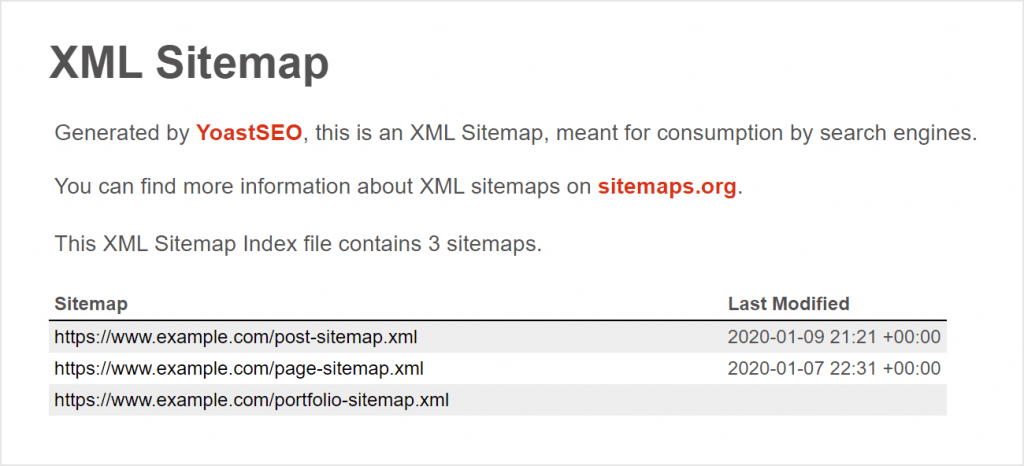
Hopefully, your website migration will be a seamless process, but there is always the risk of unexpected bugs. You will need to evaluate your existing live pages as well as your XML sitemapA site map is a list of pages on your site and their relative importance. Use sitemaps to make it easier for visitors to find what they're looking for, and to ensure that search engines can find all the information they need.. You can do this using the Google Search Console and the Fetch and Render feature. This will highlight any issues that you will need to address.
 10: Tell Google
Once all of your pages and content have been migrated, open up the Google Search Console again. Use the ‘Change of Address’ option so that the search engine is fully aware that this is not an entirely new website and merely a change of URL.
Make sure that you try to recreate your old XML sitemap. Once you feel that your sitemap is right, submit it to Google Search Console. Keep an eye out for 404s, traffic changes, and crawl errorsGoogle crawl errors are errors that prevent Google from accessing a page.. Continue to build your links into your new website, and use your website migration as an opportunity to make improvements to your onsite SEO. This will mean that you are not just avoiding the risks of website migration, but using the process to make even more improvements to your online visibility.

AI has become part of how people research and look for products, as well as…

If you’ve ever tested your website using Google PageSpeed Insights, you’ve probably been met with…
The search engine landscape is constantly changing; search in 2022 is no exception. New trends and algorithm updates occur all the time in the search engine world.
Google's Core Web Vitals reports how a page performs, and here's our checklist to improving page experience this 2022!
Link Building or Managed SEO which is right for me?

The amount you invest in your link building budget should be based on the realistic…

Search engines aren't the only automated systems accessing, interpreting, and making sense of content found…

There's plenty of scope when creating SEO campaigns. Each industry that turns to experts for…

PR has long supported brands in building authority and spreading awareness, but PR distribution has…

Towards the end of September, on the 24th, Google released the second spam update in…

Some backlinks can help a key service page gain authority, while others help to strengthen…

SEO can be complicated. It’s constantly changing and is not a one-and-done job. That’s something…
AI has become part of how people research and look for products, as well as…
If you are looking to increase your traffic, sales & leads, let's have a chat!

The team will usually respond within 1 hour.