
How Can Brands Compete in ChatGPT Without Paying for Ads?
AI has become part of how people research and look for products, as well as…


TL;DR: How to Perform an SEO Audit in 5 Steps
Check Website Indexing – Ensure Google has indexed your site by searching “site:yourdomainname” and reviewing the results.
Assess Technical Health – Audit your sitemap, URL variations, mobile-friendliness, and site speed using Google Search Console and other tools.
Evaluate Brand & Penalties – Search for your brand name on Google to check rankings and verify you aren’t penalized for black-hat SEO tactics like keyword stuffingKeyword stuffing is a technique that attempts to give pages higher rankings in search engine result pages by inserting the same keywords over and over again. or duplicate contentDuplicate content is content that appears more than once across a single website. Duplicate content can be a sign of poor resource management, low trust, or a lack of quality control..
Fix Broken LinksHyperlinks, also known as links, are the connection points on a webpage that take you to other webpages. & Content Issues – Use link checkers to remove dead links, proofread for errors, and ensure every page provides value with optimized content.
Prioritize Regular Audits – Frequent SEO audits prevent hidden issues, keep your site optimized for search engine updates, and improve organic trafficOrganic search traffic (sometimes called natural or unpaid search) is the traffic that's driven to a website because of unpaid placement on a search engine results page..
An SEO audit needs to be carried out on a regular basis. Doing so will ensure that there are no hidden surprises when it comes to your website or your overall SEO strategy. You might be under the impression that an SEO audit means having a vast IT department or in-depth technical skills. However, with the right know-how and a little guidance, it might be a lot easier than you think. If you’ve never performed an audit before, then what follows are the most vital steps to take. Do your SEO audit right, and you could find that your website visits increase rapidly, and your path to greater organic profits is far more likely.
Important Note: As you go through this step-by-step free guide, don’t try and fix your SEO issues as you go. Complete your entire audit before tackling the improvements, as this means that you will not have to keep going back over your steps.
Your first step is to ensure that your website has been indexed. You can do this through any search engine, but it’s best to focus on Google for your entire SEO audit because that remains the biggest and most popular search engine.
In order to see if your site has been indexed on Google, simply type ‘site:yourdomainname’ into the search query box. This will reveal how many of your web pages there are that Google identifies. You will also get to see the meta tagsA meta tag is a structured data element that appears in the head section of a webpage. that Google shows to users.
Make sure that you write down what your index search has revealed.
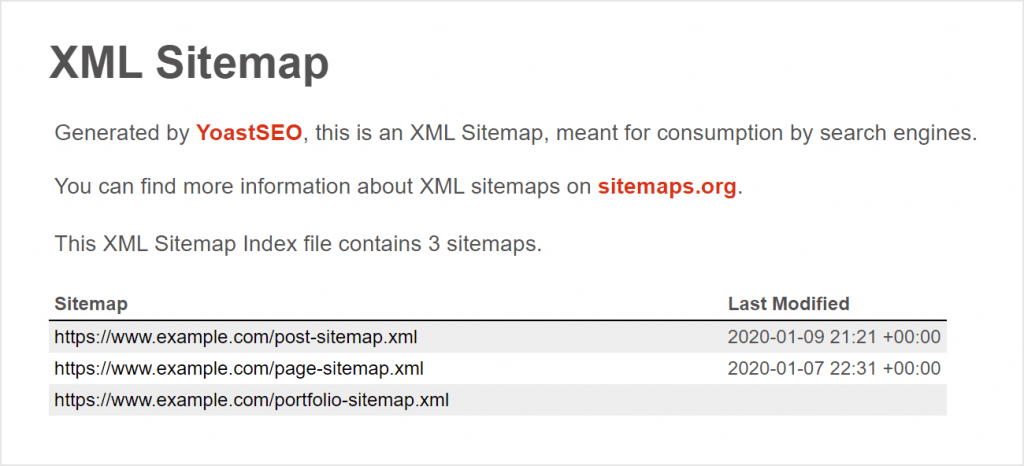
Your sitemap will determine how easily Google can crawl through your site in search of relevant information. You can test this easily using Google Search Console. Use the simple to use interface to conduct an analysis of your site, and make a note of any issues that are highlighted. Google Search Console can also let you know specifically which pages of your website are not being indexed by Google.
 Step Three: URL Variations
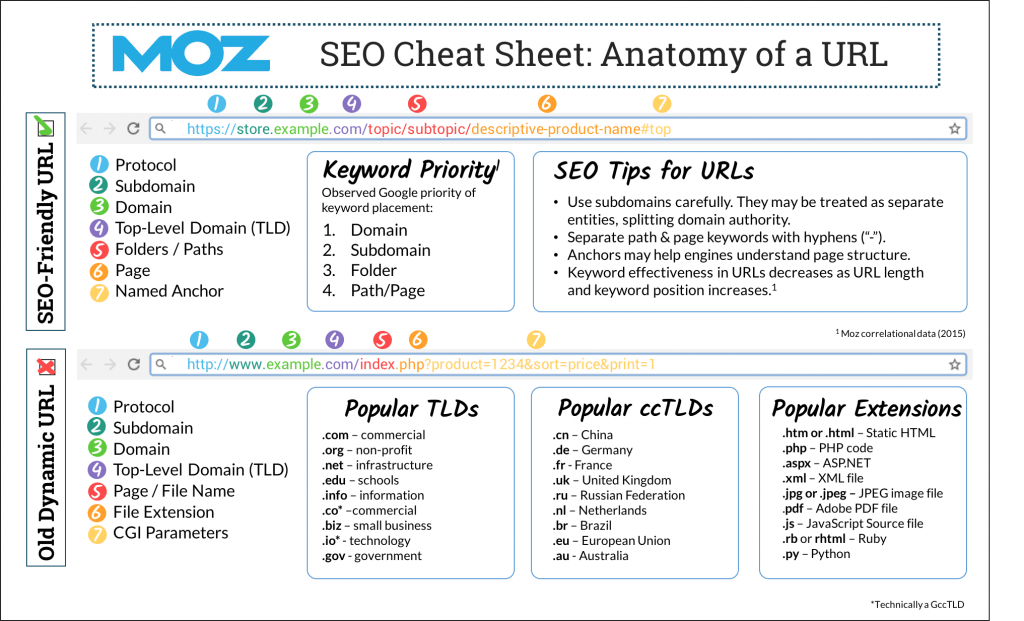
There are a number of ways that your website address might look. They could end with .com or .co.uk; they could start with www, or with https. All variations of your URL should lead to your own website. You should have HTTPS enabled on your domain, and if you have yet to do this, then it’s a smart move to do so immediately. Check your website platform, as the majority will have this as a simple option to tick in your settings pages.
 Step Four: Mobile Friendliness
Your website has to be optimised for mobile, and your SEO will suffer if it is not. Use Google’s own testing tool, or Google Search Console can do much the same action.
Now that you have an awareness of any initial issues, you need to check how Google ranks your site. Do a brand name search for your business. If you have a unique brand name, then you should expect to be at the top any Google query with your brand name included. However, it may be that there are other websites listed before yours, which means that you have work ahead of you. One of the main reasons why you may be ranked lower than other sites with similar names is down to having the wrong pages prioritised for SEO, but this can be a simple fix. You could:
Link buildingLink building is a process of acquiring links pointing to your website. These links are obtained by creating content, participating in social media or commenting on other blogs. is one of the most important elements of any SEO strategy, so you should get used to the essentials.
You will be penalised by Google if you are using underhand or outdated SEO techniques. These are known as black hat practices and should be eradicated from your website as soon as possible. Some of the most commonly seen black-hat techniques include:
If you are using any of these methods, then you will not only be identified by search engines but will be penalised by them as well. This can cause a huge problem for your website, and it can be a lengthy process when it comes to penalty recovery. Check with online tools to see if you are being negatively affected by SEO algorithm changes.
All websites change over time, and if you have included links on your site to a page that no longer exists, then you are not only creating a customer journey roadblock, you are also going to be less easy to crawl through for search engine bots. Run your pages through a link checker, which will give you a list of links on your website that lead to nowhere. Having those links means that you have a clear idea of how to fix them.
Important note: Some website building platforms have a link checker add-on included, but you do not need to do this. Many have been shown to slow down your website speed, and when loading times have such an important part in your overall SEO, then you don’t need to find new ways to slow your pages down.

Don’t panic; you don’t need to be an SEO expert to do some simple technical checks. Using the online tools available, you can ensure that the following SEO elements are checked and improved:
The first time that you tackle your SEO audit will usually result in plenty to do. The more often that you perform an audit, the less you will be affected by algorithm changes and evolving consumer trends. When SEO can have such a proven effect on your sales, it is imperative that your website has a firm focus on being easier and more proactively found by search engines and the people that use them.
Click Intelligence has launched a new SEO reporting tool called Click Insights which has a build in SEO audit tool. Or if you need support with technical SEO or managed SEO contact us today.

AI has become part of how people research and look for products, as well as…

If you’ve ever tested your website using Google PageSpeed Insights, you’ve probably been met with…

If Google's latest Core Web Vitals update has caused havoc to your SEO results, find your solution in our latest in-depth eBook.
Ever wondered why certain websites appear at the top of Google’s results page when you search for something? That’s no…

Budgeting for SEO is a terrifying prospect. There are so many elements in play, and seemingly endless considerations, rendering it…

The amount you invest in your link building budget should be based on the realistic…

Search engines aren't the only automated systems accessing, interpreting, and making sense of content found…

There's plenty of scope when creating SEO campaigns. Each industry that turns to experts for…

PR has long supported brands in building authority and spreading awareness, but PR distribution has…

Towards the end of September, on the 24th, Google released the second spam update in…

Some backlinks can help a key service page gain authority, while others help to strengthen…

SEO can be complicated. It’s constantly changing and is not a one-and-done job. That’s something…
AI has become part of how people research and look for products, as well as…
If you are looking to increase your traffic, sales & leads, let's have a chat!

The team will usually respond within 1 hour.