
Optimizing Website Imagery – Your Complete Guide
Fully optimized website images that load quickly are essential to creating a good user experience…

Since its launch in May 2003, WordPress has grown to become one of the leading website creation tools in the world, powering nearly one-third of all websites online. It is open-source and completely free to use; however, there are various paid membership options, starting from £20 per month for a Business Plan and £36 per month for an eCommerce Plan.
With so many active websites using WordPress as their preferred content management system, it is no surprise that some are faster than others with regards to loading speeds, as different combinations of content can have different effects on how quickly a website runs.
However, nowadays, loading speeds have become far more of a hot topic than when WordPress was first released, as competition online has grown exponentially. According to research conducted in 2011, the average web user expects a website to load in less than two seconds, while 40 percent of visitors will abandon it altogether if it takes longer than three seconds. This shows, then, that page loading speed is ultimately a key influencer on everything, from traffic to bounce rateBounce rate is the percentage of visitors to a website who visit only one page. A high bounce rate indicates that visitors are not satisfied with your website. to conversions and user satisfaction.
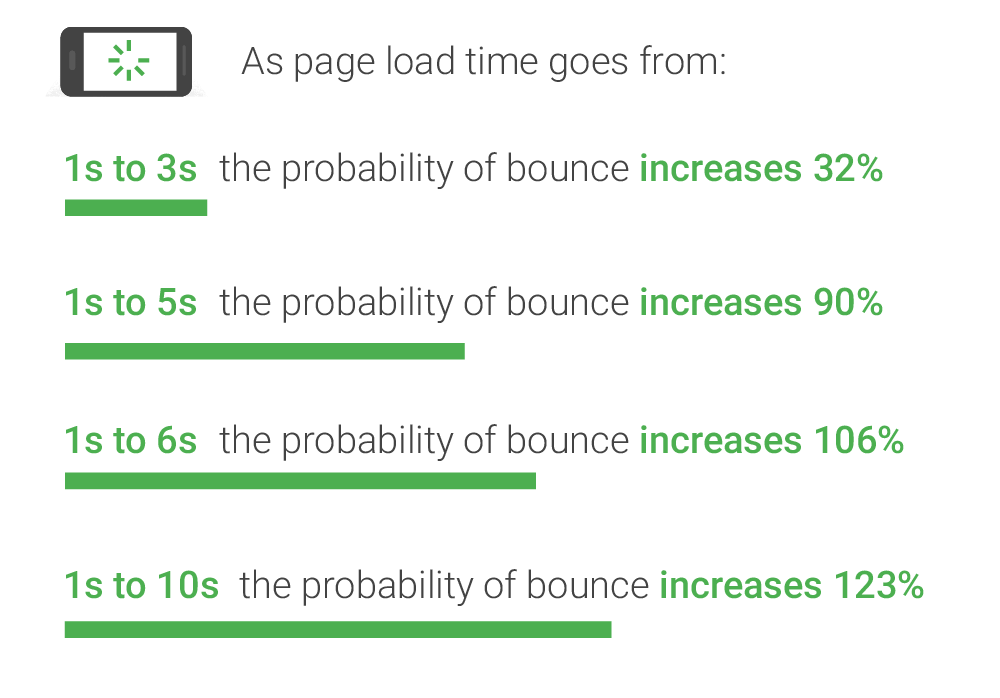
Below are some steps that can be taken to improve your WordPress website’s loading speed so that you can maximise the user’s experience and convert clicks to profit.
One of the most significant factors that can influence the speed of your WordPress site is the hosting provider you opt for. The hosting provider is the service that maintains where the data associated with your website resides, including text, images, videos and plug-ins.
The more disk space and bandwidth you are allotted on the server, the quicker and more smoothly your website will run. One of the issues is that many website owners tend to go for the provider which seemingly offers the most features, such as ‘unlimited bandwidth,’ emails and domains on shared hosting. However, shared hosting often delivers very poor performance when it comes to speed, as you will be forced to share space with others who may overcrowd the server and slow you down.
A better option would be to use WordPress’ very own dedicated hosting, meaning your website will operate on a server optimised explicitly for it. While this might have seemed like an expensive option in the past, the world of web hosting has progressed with developments in technology, and the prices of hosting providers have decreased with time.
Browsing online is a very visual experience, making images an essential component to creating an interesting and engaging website. However, unfortunately, high-quality images can have the effect of significantly increasing the speed at which your site takes to load, as they require far more space than both text and CSS. Data from HTTP Archive in 2018 indicates that, on average, images comprise over one-fifth of a total webpage’s weight, yet it is one of the most simple problems to solve.
So, how do you reduce the size of an image file, while at the same time maintaining quality? The secret is compression. Compression involves using a plugin or script to optimise images and induce a reduction in their size without compromising how the image appears to viewers. It can be done both manually or automatically, depending on the balance between file size and image quality you are after.
The best WordPress plugins for automated compression include the following:
WordPress themes offer users a broad selection of dynamic features, including sliders, widgets and social media icons, which will make your website look great. Look great that is, once you have waited an age for it to load! Every little feature that you have on your website consists of individual code that needs to be loaded, meaning the more you have, the slower it will be.
Opting for a simple, ‘lightweight’ theme that only adopts the most essential features is an easy way of ensuring your website is not being held back by multiple unnecessary functions and instead offers visitors a quick webpage performance.
WordPress even provides its very own set of lightweight themes to choose from, including GeneratePress, Zakra, Astra, Airi, Ocean WP and Page Builder Framework. These themes are great as they contain all the most essential functions, yet they are minimalistic and prioritise the user experience over an abundance of flashy content.
Security risks aside, getting into the habit of keeping your website up-to-date is a simple way of ensuring it is running as close to peak performance as possible. Whether it is a core update or new versions of plugins, WordPress developers are continually making adjustments to the software, keeping it optimised and fast.
Keeping your PHP updated is also an essential part of maintaining a quick loading speed, with regular changes often made. A good hosting server will duly notify you if there is an update to your PHP to be made, however not all will, so it is a good idea to check whenever you can.
A content delivery network (CDN) is a geographically distributed server that delivers web content to internet users around the world. For people residing in a different country to that of your website, the loading speeds will be slower due to the extra time it takes to transmit, and a CDN is there to help keep the speed to a minimum. It keeps a version of your website stored in different data centres located around the world, so that when someone visits the site, the page will be loaded from the nearest server location, thus reducing download time.
If you intend for your website to reach a global audience, then using a CDN service is a must. Some of the best include Amazon Cloudfront, Sucuri, StackPath Max CDN, Rackspace and Cloudfare.

Fully optimized website images that load quickly are essential to creating a good user experience…

If you desire to create an online store on your WordPress blog or website, the…

Budgeting for SEO is a terrifying prospect. There are so many elements in play, and seemingly endless considerations, rendering it…

Here is how to find the perfect link building partner, download today!

Without the correct tactics, your website doesn’t have a chance of appearing prominently on search engine results pages. Because if…

The amount you invest in your link building budget should be based on the realistic…

Search engines aren't the only automated systems accessing, interpreting, and making sense of content found…

There's plenty of scope when creating SEO campaigns. Each industry that turns to experts for…

PR has long supported brands in building authority and spreading awareness, but PR distribution has…

Towards the end of September, on the 24th, Google released the second spam update in…

Some backlinks can help a key service page gain authority, while others help to strengthen…

SEO can be complicated. It’s constantly changing and is not a one-and-done job. That’s something…

AI has become part of how people research and look for products, as well as…
If you are looking to increase your traffic, sales & leads, let's have a chat!

The team will usually respond within 1 hour.