
Google August 2026 Spam Update Has Finished Rolling Out: What It Means
Google announced it was rolling out a further spam update on August 18, 2026. It…


Since their introduction in May 2020, Google’s Core Web Vitals, a set of metrics introduced to improve page experience, have given both web developers and SEO teams something extra to think about. There are numerous elements involved that make up the Core Web Vitals, with one of them being FID.
What does FID stand for, exactly? That’s an easy answer: First Input Delay. Now you might be wondering, what is First Input Delay? Well, that’s trickier to answer.
The following in-depth look, however, will explain FID, how it can be improved, why it has become part of our managed SEO campaigns, and much more.
Let’s get started!
 With the Core Web Vitals, there are three main measurements used: Largest Contentful Paint (LCP)The largest contentful paint is a measure of the render time taken for the largest visible contentful area of a page to load., Cumulative Layout Shift (CLS)Cumulative Layout Shift (CLS) is a Google Core Web Vitals performance issue that can be detected by Google PageSpeed Insights., and, importantly for this particular guide, First Input Delay (FID)First Input Delay measures the time between the user's initial input and when they see the result of that action on screen..
FID is a web performance metric which analyses a specific aspect of website speed. This measurement, as the “First Input Delay” name suggests, tracks the time required for the browser to process the first interaction a user makes with a webpage. Also known as Input Latency, this initial interaction is done while the website is still loading.
As for First Input Delay examples, here’s what Google has to say:
FID is a metric that measures a page’s responsiveness during load. As such, it only focuses on input events from discrete actions like clicks, taps, and key presses. Other interactions, like scrolling and zooming, are continuous actions and have completely different performance constraints.
So examples of “input events” include clicking or tapping a button or link, where the user is then left waiting for the subsequent response. Other interaction points measured by FID include dropdowns, checkboxes, and text input areas.
Simply put, FID is used by Google to measure the responsiveness of a site as it’s loading. The browser can still be busy loading the page’s large element, as FID is only about that first interaction. Consequently, this metric is tracked in just milliseconds (ms).
When a user encounters a website with poor FID performance, they are left to deal with a webpage that displays unresponsive behaviour. Their attempts to interact with the page, whether it be clicking on a link or a text input box, is delayed – which can lead to a frustrating user experience.
However, why is this aspect of the user experience negatively impacted by FID? Well, the issue is typically attributed to images and scripts being downloaded in a disorderly manner. This lack of order means when a web page begins to download, it will start, pause, start, pause, and continue to do so in an excessive manner.
Think of it like queuing up to enter a building. If there’s no order and a free-for-all commences, the queue will turn into an unorganised mess where people don’t know where to stand and when to proceed forward. If that queue is structured correctly, however, with barriers and people directing the traffic, order is established.
FID is used to provide that order to a webpage’s coding. It ensures that scripts and images are downloaded in the correct sequence.
Here’s how Google explains the cause of input delays:
In general, input delay happens because the browser’s main thread is busy doing something else, so it can’t (yet) respond to the user. One common reason this might happen is the browser is busy parsing and executing a large JavaScriptJavascript is one of the web’s key programming languages but coding it incorrectly can cost you in technical SEO terms. In order to avoid common mistakes, and understand how Java operates, here’s a quick guide to coding Java the right way. file loaded by your app. While it’s doing that, it can’t run any event listeners because the JavaScript it’s loading might tell it to do something else.
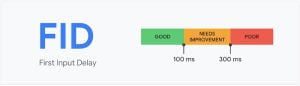
To help website developers improve their FID score when required, Google has supplied a helpful guide as to what is – and isn’t – a suitable speed for the initial input delay. Here’s how it is measured:
The objective is to hit that “good” sweet spot. A “poor” grade is, obviously, not something you want to achieve, but the same is also applicable for “needs improvement”. You’ll only be achieving what Google deems appropriate if you land in that 100 ms or under section.
Compared to other metrics that are used, FID is a unique case. This is because lab tools are not used to measure FID – you can only use field tools. The reason for this is simple: a measurement can only be achieved when real users are there to interact with your site.
Examples of tools you can use for FID include:
There is an aspect you might be wondering about in terms of measurement: What happens when a user visits your site but doesn’t make any type of valid interaction? Well, not every user on your site will possess any FID values, and certain interactions – as mentioned above – are not relevant to this metric.
For Google to count the overall score for this metric, you have to achieve a “good” grade with at least 75% of relevant page loads. It may sound harsh (we certainly think so), but if you only have 74% page loads considered “good” along with 26% “poor” loads, Google will classify your site as having a “poor” FID score overall.
When you check Core Web Vitals, the threshold for achieving an overall “good” grade for each one is 75%. However, Google recommends you aim for a much higher percentage when it comes to FID:
…For FID in particular we still strongly recommend looking at the 95th–99th percentiles, as those will correspond to the particularly bad first experiences users are having with your site. And it will show you the areas that need the most improvement.
You’ve analysed the situation and made an unwanted discovery: your FID score is not hitting that essential “good” ranking. If you’re thinking, ‘How to improve my FID vital successfully,’ we have a number of tips below to help out.
A “long task” is a script that takes 50ms or longer to run on the main thread. With speed being imperative, you need to try and avoid long tasks from blocking up the main thread. If you cannot avoid them entirely, see if it’s possible to break these down into smaller tasks.
One way to reduce the main thread’s workload is to delegate some of the workload to web workers. These web workers will allow for some JavaScript code to operate on a worker thread, lowering the input delay as a result.
You want to avoid blocking the main thread. However, the guilty party for this is typically third-party code. Think of the likes of analytics and tags.
Admittedly, there are certain pieces of third-party code which need to kick into action from the very start of a page load. For instance, analytics sometimes need to load from the beginning to track whole visits correctly.
With that said, the page will likely feature third-party code that doesn’t require being loaded from the get-go. In this case, only prioritise loading what’s required and avoid any unnecessary third-party code.
On a webpage, a JavaScript will be render-blocking. This means if a browser comes across a JavaScript, it has to pause whatever else is doing and prioritise loading that script first. As a result, the more scripts used, the more likely it will impact execution times – not good for FID.
You should take the steps to only use scripts which are critical for your site. Along with removing any JavaScripts that are currently unused, you can also defer needless JavaScript.
When possible, you should be attempting to remain server-side for when content is generated. By doing this, you minimise how much data, on the client-side, has to be post-processed. The result: less work is required from the browser when it comes to rendering a webpage.
A fast website is essential when it comes to a successful SEO campaign. With Core Web Vitals, the aspect of a fast site – and user experience overall – goes to another level where there’s an emphasis on specific elements.
If you have a speedy website already, you may believe there’s no need to analyse or fix Core Web Vitals on your site. That isn’t the case. With FID specifically, most well-ranking sites are hitting the mark and achieving a “good” score. If your site isn’t managing this, that’s an aspect where the competition is gaining an edge in terms of SEO.
With Core Web Vitals, 2022 might not provide a clear picture about the impact it has on SEO. This page ranking factor is still in its infancy. Nevertheless, Google has pushed the Core Web Vitals heavily – and that makes us think it will play a large role in the future.
Your SEO auditing efforts now need to include First Input Delay, along with all the other Core Web Vitals. If you’re not quite achieving the necessary speed for a “good” rating, the advice above will assist. Although with the technical nature of FID, you could feel more comfortable receiving professional hands-on experience – something which we can also do!
For more information about Core Web Vitals and to remain up to date with these factors, please visit our Knowledge Hub.


Google announced it was rolling out a further spam update on August 18, 2026. It…

If you’ve ever tested your website using Google PageSpeed Insights, you’ve probably been met with…

It's clear that a new management approach can do wonders for your company, and one of the most cutting-edge and…

Ever wondered why certain websites appear at the top of Google’s results page when you search for something? That’s no…

Are you struggling to think about what to write about for your content marketing efforts? It’s not an uncommon situation–particularly…

Some backlinks can help a key service page gain authority, while others help to strengthen…

SEO can be complicated. It’s constantly changing and is not a one-and-done job. That’s something…

AI has become part of how people research and look for products, as well as…

Growing an SEO agency takes a lot of hard work. You've got to keep up…
Google announced it was rolling out a further spam update on August 18, 2026. It…

Instead of scrolling through pages and pages of endless search results, more people are now…

When your target customer heads to Google to search for a product or service, or…

Artificial intelligence (AI) is changing the way that people are searching for information. Tools like…
If you are looking to increase your traffic, sales & leads, let's have a chat!

The team will usually respond within 1 hour.