
How to Optimise Service Pages for AI Search and LLM Recommendations
There’s no hiding from it. AI search and large language models (LLMs) like ChatGPT and…

As one of the top SEO agencies out there, our duties extend beyond creating SEO campaigns, audits, and reports for our clients. We pride ourselves on sharing the latest news on algorithms and tools commonly used across the industry by experts and businesses alike. Google is always developing and tweaking its systems, tools, and algorithms to ensure they are delivering the best experience to its users and customers. Therefore, it is not unexpected to see another update, this time to their . Our blog is here to cover everything to know about the Lighthouse 13.3 Agentic Browsing update that came out in May, so you don’t have to go anywhere else to feel confident about your newfound knowledge.
If you are already familiar with this tool, feel free to move on to the juicy details about the latest update, but for those who are new to Google Lighthouse, it is worth taking a few moments to learn more about what it is.
Google Lighthouse is an open-source website auditing tool that Google originally released back in 2016 as a Progressive Web App (PWA). Over the last 10 years, Google has evolved this to become one of the most comprehensive auditing tools that is directly integrated into Google Chrome and can analyse the quality and performance of websites.
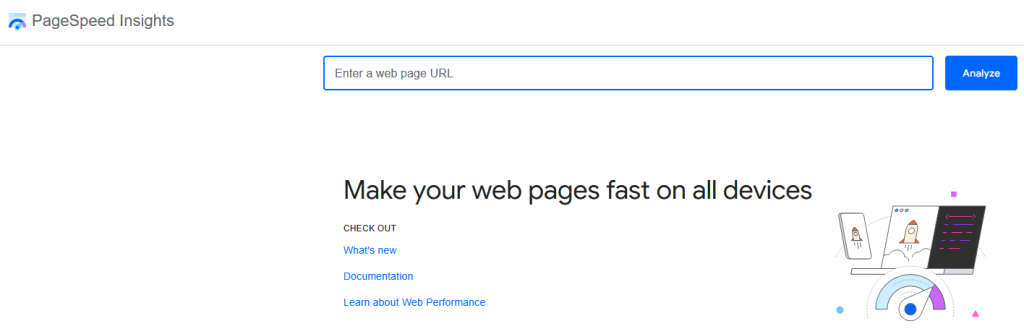
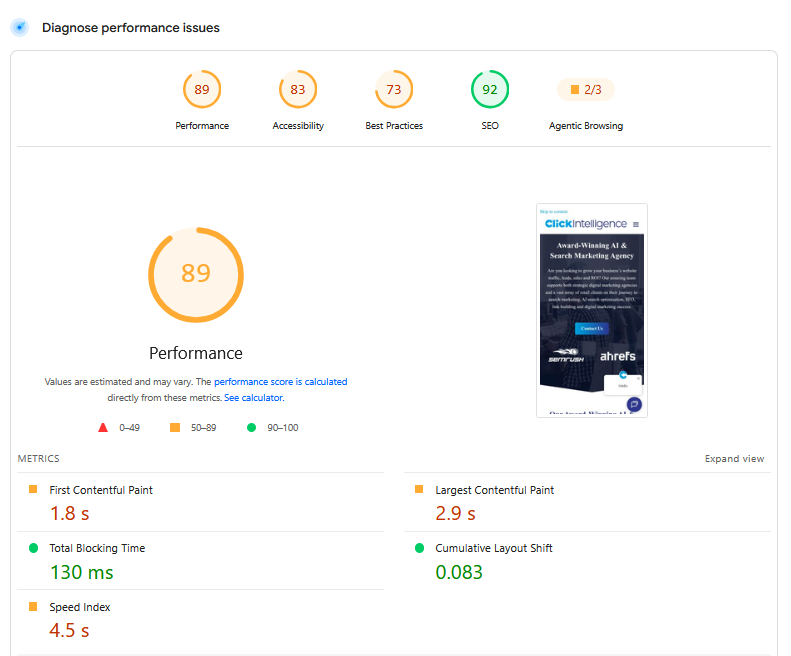
Lighthouse can be run in several ways, including through the browser. Most experts run it through Google PageSpeedThe Google PageSpeed Insights Tool is a free and easy-to-use tool that provides webmasters with a score (from 0 to 100) that reflects the performance of their site on mobile devices. Insights, but you can do it via the Lighthouse command-line interface if you are happy with automated testing, or as part of continuous integration workflows during development. Lighthouse then generates a score between 0 and 100 for each category (performance, accessibility, best practices, and SEO), provides specific recommendations for improving your site, and estimates the performance gains from implementing those recommendations.
It is important to note that Lighthouse scores do not directly impact rankings. The metrics given just help highlight areas where improvements can be made and what is influencing search visibility.
The 13.3 update has introduced a new category called Agentic Browsing. As it is still fairly new, there’s yet to be complete clarity of what websites will need to focus on, but this is understandable at this stage of development. However, this is everything we know about the new Agentic Browsing category.
Understanding the Agentic Browsing Category Audit
This new category will assess how well your site is made for machine interaction (AI) using a set of deterministic audits. In other words, can AI read your pages, understand what you are selling, trust you, and require minimal guessing when doing any task on your website? As part of these audits, it will look into:
The accessibility tree represents your page structure, exposing it to screen readers and other accessibility tools in a simplified format that AI agents can use. They find this a lot easier than processing the full HTML code or a screenshot. The tree itself should not contain decorative elements but rather be well-structured. If it is not well-formed, it will detail what audits have failed. For example, your documents may have failed to include a <title> element, or your img elements may not have alternative text.
When your website has actions such as booking, searching, or purchasing, without WebMCP, your AI agent has to go through multiple steps, which can get confusing; you are essentially asking them to operate a machine without instructions. With WebMCP, you reduce these steps to one simple instruction. However, during these audits, Lighthouse will determine whether you have registered this correctly and that their schemas are valid.
Not having a stable layout doesn’t just annoy your visitors. AI agents can face functional failures if your content layout shifts. Late-loading content can cause layout shifts, leading to incorrect clicks by the agent, while missing elements will cause another failure.
This audit checks whether an llms.txt file exists at your domain root and if it follows the expected format, containing the required elements. It will assess whether you are following current recommendations, like headings and useful linksHyperlinks, also known as links, are the connection points on a webpage that take you to other webpages.. As this helps AI systems understand your site’s content, it will be one of the most important results to get and act on.
A Look Into the Agentic Browsing Scoring
The major difference is that it doesn’t provide a score in the same way the other categories do. As it emerges, their focus will be on gathering data and, from this, providing actionable signals rather than specific rankings. Therefore, rather than providing a 0-49 (Poor – red), 50-89 (Needs Improvement – orange), 90-100 (Good – green) rating for this new category, you will get a fractional score, a pass or fail status for specific audits, or informational counts.
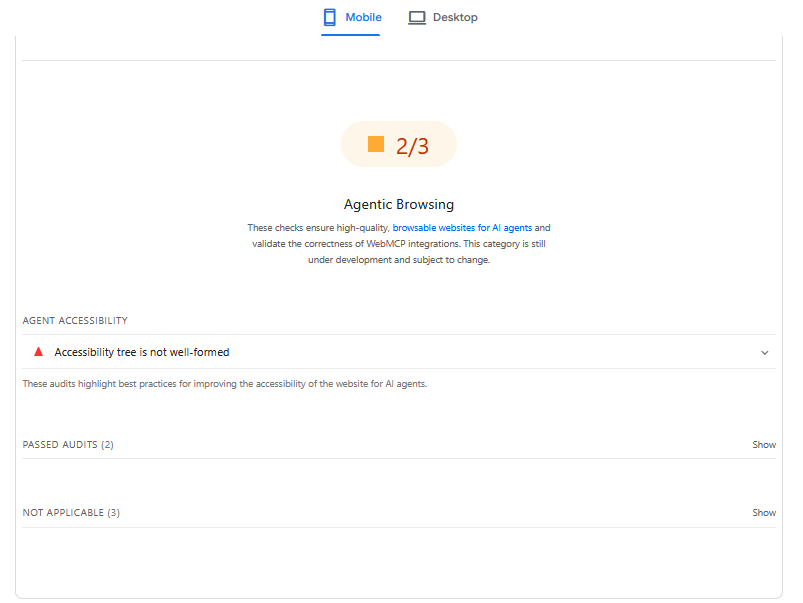
Your fractional score may show as 1/4, for example, based on how many audits you passed that are applicable to you. If all 4 audits are run, you may get one of the following:
However, if you run only 3 audits and 2 pass, the denominator will reflect that, showing 2/3 instead.
The information provided in the report will not directly say that your site is good or bad for each AI system. It simply wants to let you know whether your pages provide a reliable enough structure for machine interaction. Your page may appear perfectly fine to humans, but that doesn’t mean AI agents (autonomous software systems) will understand it.
Check Your Score
If you are already working with our team, get in touch with your dedicated account manager for the latest on your score. We can check it for you. However, if you are going solo or wish to find out immediately, you will need to do the following:
Enter your website URL. Then click Analyse. The report will then be generated in a matter of seconds, providing you with your scores between 0 and 100, alongside recommendations for all categories, except the agentic browsing category, which will present a fractional score.
Open your website in Google Chrome, then right-click anywhere on it. When it displays a drop-down menu, select Inspect. Here, you can then click the Lighthouse tab and choose the categories you would like to audit. Then, select to simulate Mobile or Desktop before clicking Analyse Page Load or Generate Report. Your results will show up almost immediately.
Note: If you can’t find the Lighthouse tab, click the >> menu to find it.
Results Will Always Fluctuate
We always recommend running the tests several times because the results are based on a simulated environment. Running it several times gives you a more accurate idea. However, it is common to see fluctuations in results depending on how well your site registers its tools or responds to agentic requests. You might be impacted by dynamic tool registration, Variability in A11y tree construction, or Cumulative Layout Shift (CLS)Cumulative Layout Shift (CLS) is a Google Core Web Vitals performance issue that can be detected by Google PageSpeed Insights..
Acting on Recommendations
Don’t worry if your score feels lower at this point, or if you have lots of fails displayed. The new category is still under development and may be having an influence. Nevertheless, it is still good to act on the recommendations made to put yourself in the best possible position and make your website agent-friendly.
These recommendations will vary from website to website. You might see recommendations for your accessibility tree, such as semantic HTML, descriptive labels, or correct ARIA attributes. Others might see suggestions like reducing layout shifts (CLS), validating WebMCP tools, or labelling interactive elements.
Whether you are already working with our team or new to our company, we can provide the support you need to handle this latest update and be on hand to explain what you will need to do for the most success.

There’s no hiding from it. AI search and large language models (LLMs) like ChatGPT and…
Businesses no longer need to create content solely for traditional search engine results pages. AI-powered…
There’s a good chance that you’ve already heard of PPC. As a marketing tool, PPC is invaluable, but there seems…
Download our free Millionaires SEO Guide Today!
As one of the top SEO agencies out there, our duties extend beyond creating SEO…
There’s no hiding from it. AI search and large language models (LLMs) like ChatGPT and…
Businesses no longer need to create content solely for traditional search engine results pages. AI-powered…
While traditional SEO will always be important, brands are now also thinking about how they…
How people search and compare products online has changed. Just a few years ago, a…
Two weeks have passed since we first updated you about the Google May 2026 core…
Bringing on a new service is expensive, time-consuming, and not a decision to be taken…
More and more agencies are looking to scale their digital marketing services without dramatically increasing…
If you are looking to increase your traffic, sales & leads, let's have a chat!

The team will usually respond within 1 hour.